set.seed(42)
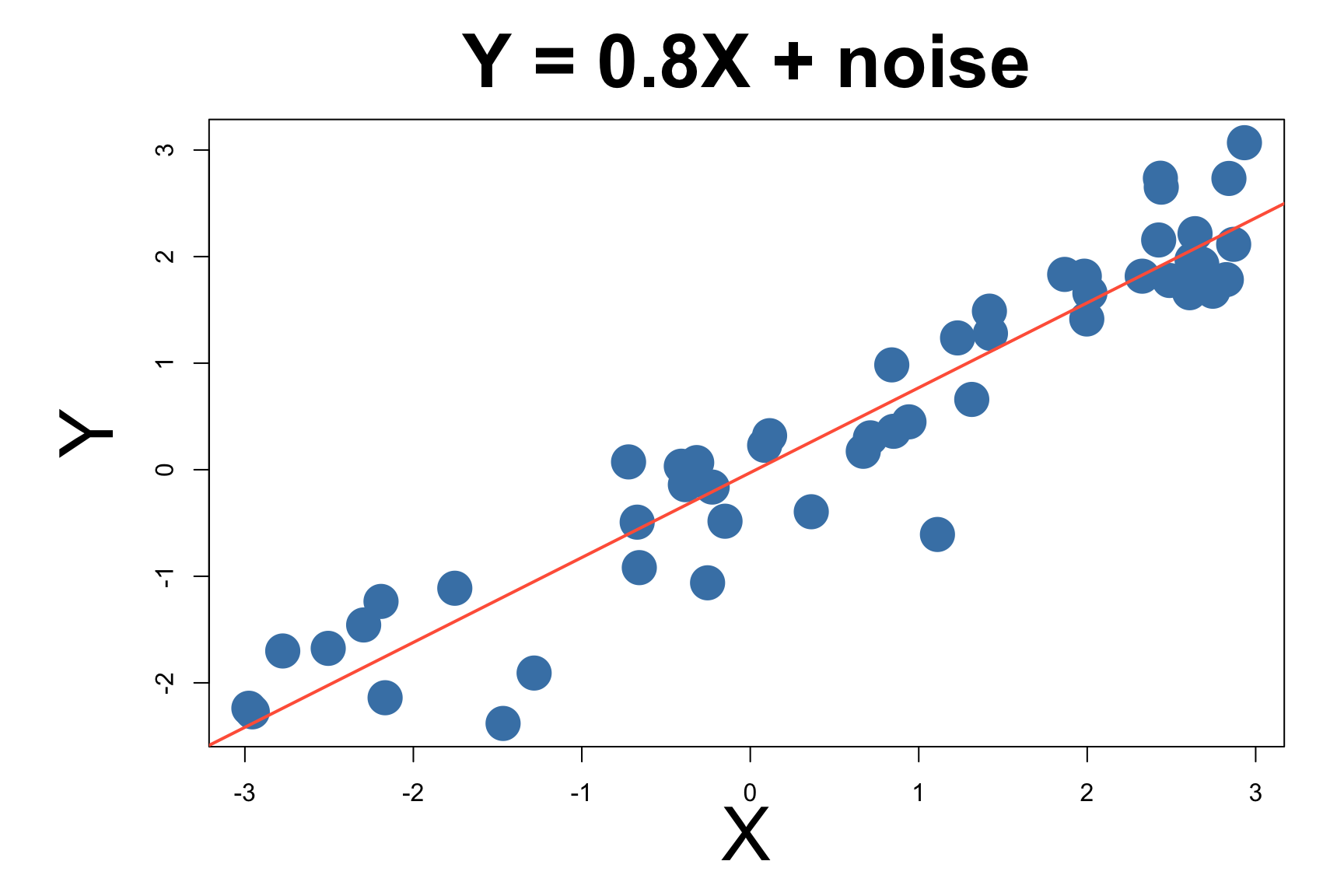
x <- runif(50, -3, 3)
y <- 0.8 * x + rnorm(50, sd = 0.5)
plot(x, y, pch = 19, col = "steelblue", cex = 1.2,
xlab = "X", ylab = "Y", main = "Linear: Y = 0.8X + noise")
abline(lm(y ~ x), col = "tomato", lwd = 2)
GENE 46100 — Unit 0
Haky Im
March 25, 2025
| Unit | Topic |
|---|---|
| 0 | Can we detect regulatory motifs in DNA? |
| 1–3) | |
| 1 | Can we learn the “language” of DNA? |
| 2 | Can we predict gene regulation from sequence? |
| 3 | Can we model microbial communities? |
Tools we’ll use:
By the end: You’ll understand how state-of-the-art models predict gene expression from DNA sequence
. . .
These models learn patterns we didn’t know to look for.
You already know this:
y = X\beta + \epsilon
where \epsilon \sim N(0, \sigma)
. . .
Let’s simulate some data and fit it from scratch.
Since we simulated the data, we know the true \beta.
We can compute \hat{y} = X\beta and compare to y:
. . .
If the model is correct, points fall on the identity line.
The scatter off the line = noise \epsilon.
set.seed(42)
n <- 200
x1 <- rnorm(n); x2 <- rnorm(n)
coef <- c(0.8, 0.5)
y <- x1 * coef[1] + x2 * coef[2] + rnorm(n, sd = 0.3)
y_hat <- x1 * coef[1] + x2 * coef[2]
plot(y, y_hat, pch = 19, col = adjustcolor("steelblue", 0.5), cex = 1,
xlab = "y (observed)", ylab = "ŷ (predicted)",
main = "Predicted vs Observed (true β)")
abline(0, 1, col = "gray40", lwd = 2, lty = 2)
For linear regression, there’s a closed-form solution:
\hat{\beta} = (X^TX)^{-1}X^Ty
. . .
. . .
Estimated: \hat{\beta} \approx true \beta
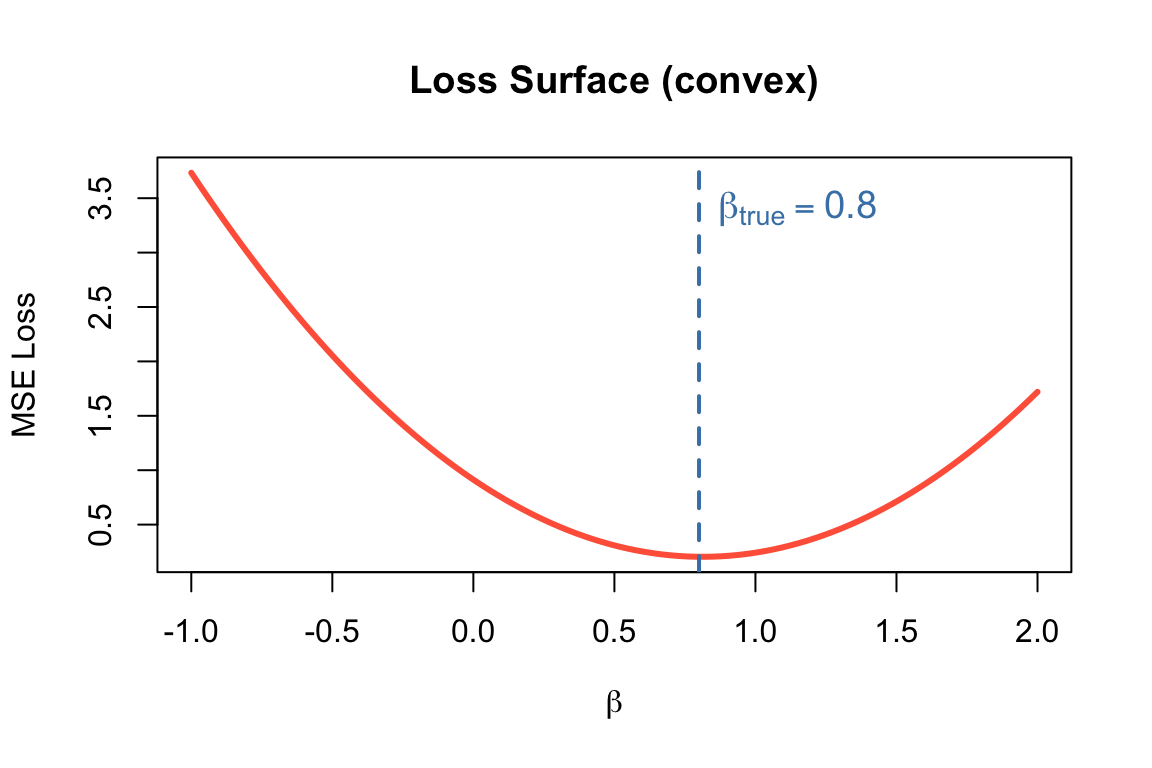
This works because linear regression has a convex loss surface — one global minimum.
# Loss surface for 1D regression
beta_seq <- seq(-1, 2, length.out = 100)
set.seed(42)
x_sim <- rnorm(100)
y_sim <- 0.8 * x_sim + rnorm(100, sd = 0.5)
loss <- sapply(beta_seq, function(b) mean((y_sim - b * x_sim)^2))
plot(beta_seq, loss, type = "l", lwd = 3, col = "tomato",
xlab = expression(beta), ylab = "MSE Loss",
main = "Loss Surface (convex)")
abline(v = 0.8, col = "steelblue", lwd = 2, lty = 2)
text(0.8, max(loss)*0.9, expression(beta["true"]), col = "steelblue", pos = 4, cex = 1.2)
The normal equation works for linear models…
. . .
But most interesting models don’t have closed-form solutions.
. . .
We need a general-purpose optimization method.
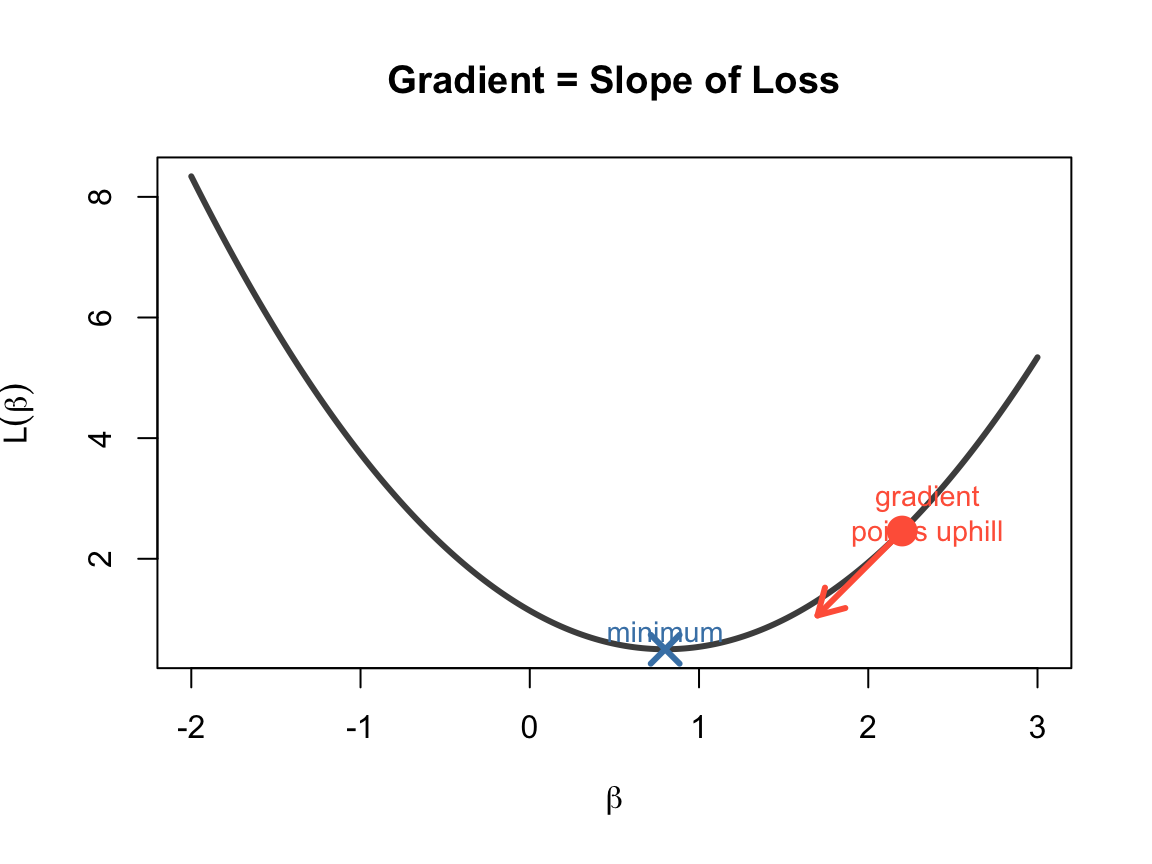
A gradient is the derivative of a function — it tells us the slope.
f'(\beta) = \lim_{\Delta\beta \to 0} \frac{f(\beta + \Delta\beta) - f(\beta)}{\Delta\beta}
. . .
x_vals <- seq(-2, 3, length.out = 200)
y_vals <- (x_vals - 0.8)^2 + 0.5
plot(x_vals, y_vals, type = "l", lwd = 3, col = "gray30",
xlab = expression(beta), ylab = expression(L(beta)),
main = "Gradient = Slope of Loss")
# Show gradient at a point
pt <- 2.2
slope <- 2 * (pt - 0.8)
y_pt <- (pt - 0.8)^2 + 0.5
arrows(pt, y_pt, pt - 0.5, y_pt - 0.5 * slope, col = "tomato", lwd = 3, length = 0.15)
points(pt, y_pt, pch = 19, col = "tomato", cex = 2)
text(pt + 0.15, y_pt + 0.3, "gradient\npoints uphill", col = "tomato", cex = 0.9)
points(0.8, 0.5, pch = 4, col = "steelblue", cex = 2, lwd = 3)
text(0.8, 0.8, "minimum", col = "steelblue", cex = 0.9)

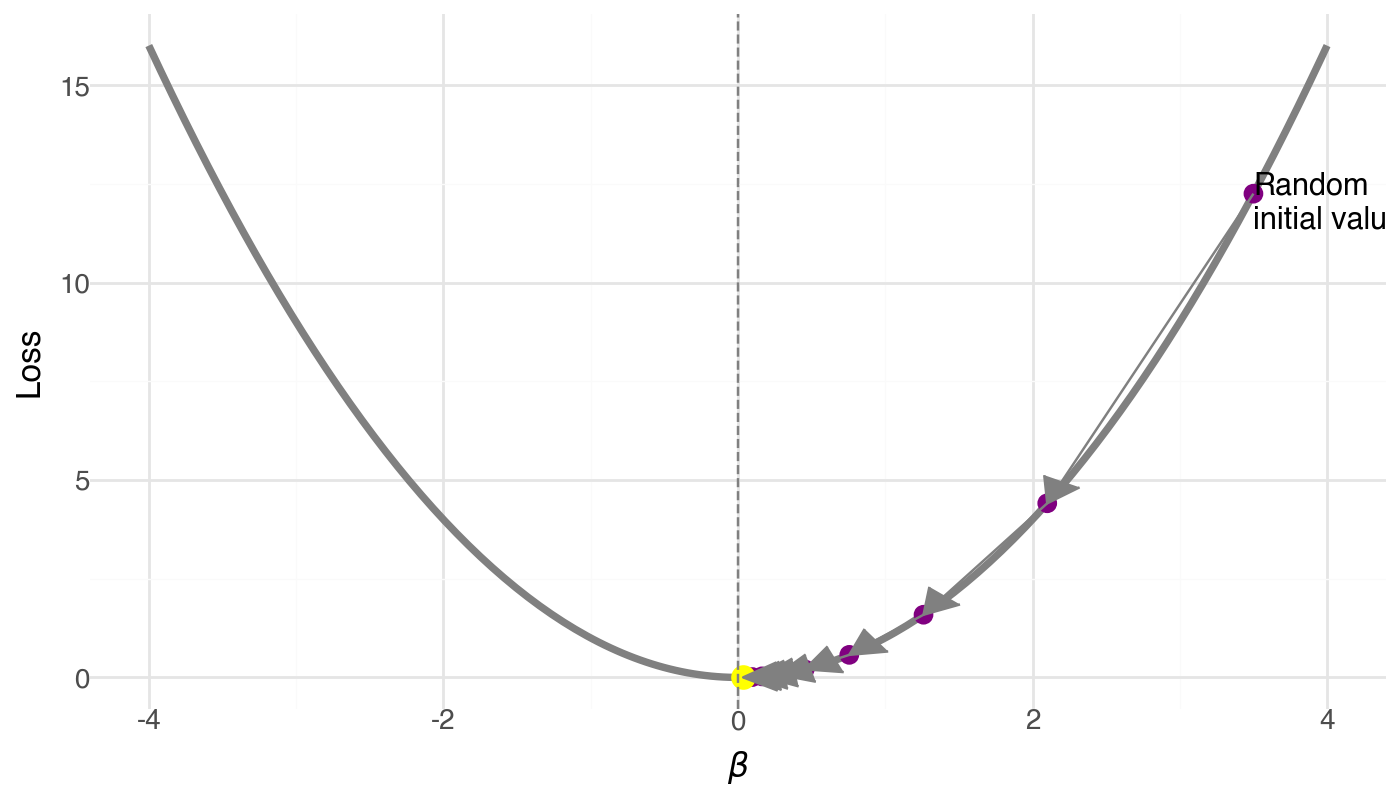
Algorithm:
. . .
\beta_{t+1} = \beta_t - \alpha \cdot \nabla L(\beta_t)
\alpha = learning rate (step size)
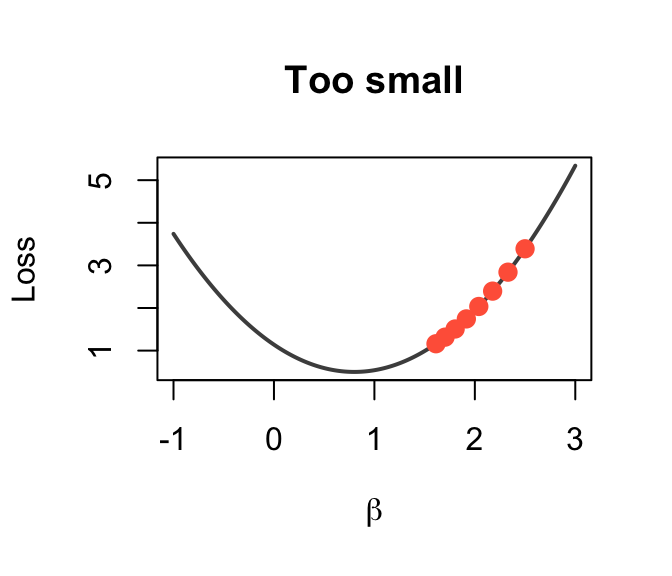
Too small (\alpha = 0.0001)
x_vals <- seq(-1, 3, length.out = 200)
loss_fn <- function(b) (b - 0.8)^2 + 0.5
plot(x_vals, loss_fn(x_vals), type = "l", lwd = 2, col = "gray30",
xlab = expression(beta), ylab = "Loss", main = "Too small")
b <- 2.5; lr <- 0.05
for(i in 1:8) {
b_new <- b - lr * 2 * (b - 0.8)
points(b, loss_fn(b), pch = 19, col = "tomato", cex = 1.2)
b <- b_new
}
Tiny steps → very slow
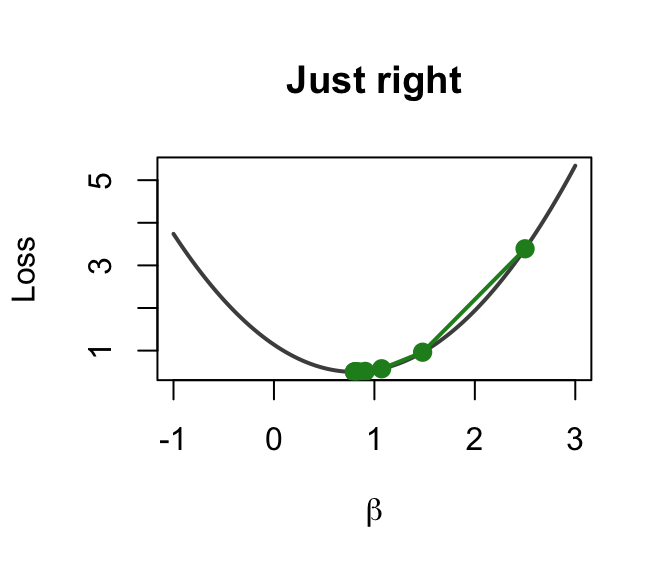
Just right (\alpha = 0.003)
plot(x_vals, loss_fn(x_vals), type = "l", lwd = 2, col = "gray30",
xlab = expression(beta), ylab = "Loss", main = "Just right")
b <- 2.5; lr <- 0.3
for(i in 1:8) {
b_new <- b - lr * 2 * (b - 0.8)
segments(b, loss_fn(b), b_new, loss_fn(b_new), col = "forestgreen", lwd = 2)
points(b, loss_fn(b), pch = 19, col = "forestgreen", cex = 1.2)
b <- b_new
}
points(b, loss_fn(b), pch = 19, col = "forestgreen", cex = 1.2)
Smooth convergence
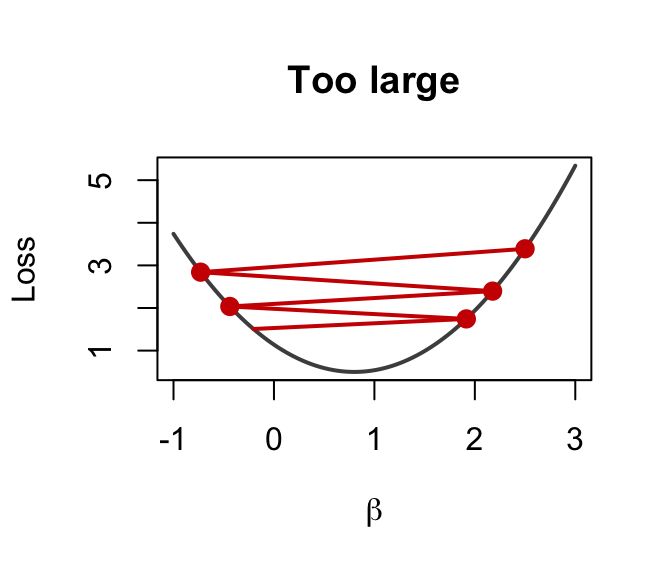
Too large (\alpha = 0.1)
plot(x_vals, loss_fn(x_vals), type = "l", lwd = 2, col = "gray30",
xlab = expression(beta), ylab = "Loss", main = "Too large")
b <- 2.5; lr <- 0.95
for(i in 1:5) {
b_new <- b - lr * 2 * (b - 0.8)
segments(b, loss_fn(b), b_new, loss_fn(b_new), col = "red3", lwd = 2)
points(b, loss_fn(b), pch = 19, col = "red3", cex = 1.2)
b <- b_new
}
Overshoots → diverges!
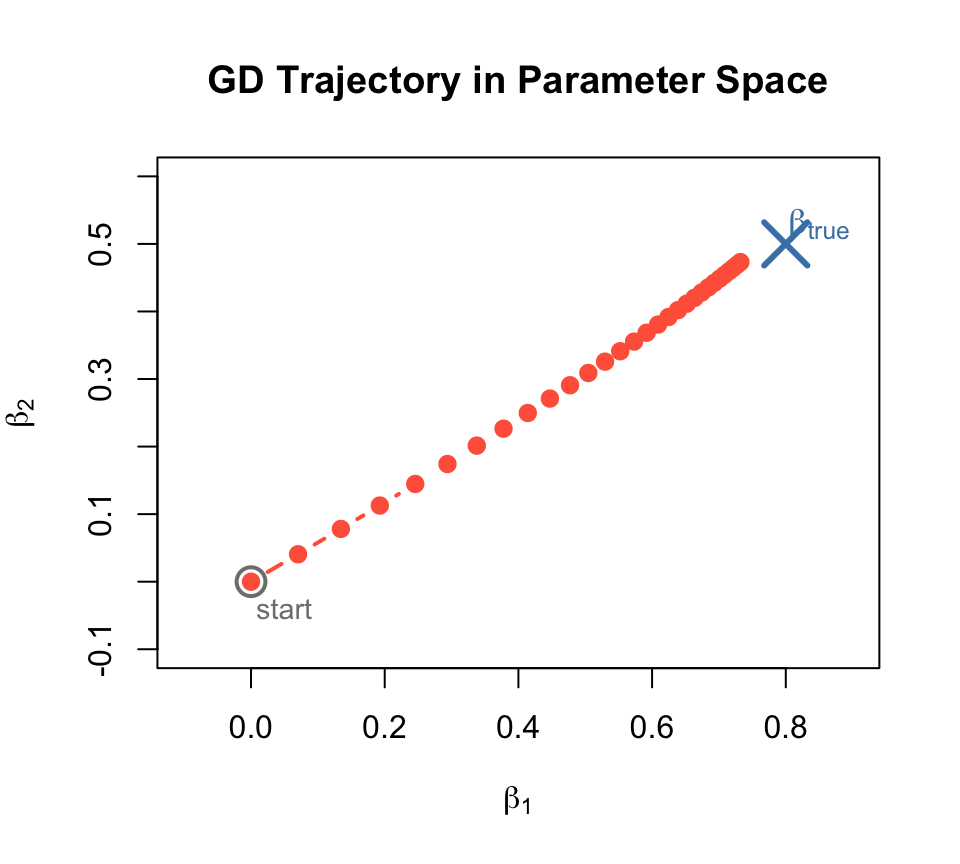
With 2 parameters (\beta_1, \beta_2), gradient descent traces a path through parameter space:
The trajectory spirals toward the true \beta.
set.seed(42)
n <- 200
x_mat <- matrix(rnorm(n * 2), n, 2)
true_coef <- c(0.8, 0.5)
y_sim <- x_mat %*% true_coef + rnorm(n, sd = 0.3)
b <- c(0, 0); lr <- 0.1
traj <- matrix(NA, 30, 2)
for(i in 1:30) {
traj[i,] <- b
grad <- t(x_mat) %*% (x_mat %*% b - y_sim) / n
b <- b - lr * as.vector(grad)
}
plot(traj[,1], traj[,2], type = "b", pch = 19, col = "tomato", lwd = 2,
xlab = expression(beta[1]), ylab = expression(beta[2]),
main = "GD Trajectory in Parameter Space",
xlim = c(-0.1, 0.9), ylim = c(-0.1, 0.6))
points(true_coef[1], true_coef[2], pch = 4, col = "steelblue", cex = 3, lwd = 3)
text(true_coef[1]+0.05, true_coef[2]+0.03, expression(beta["true"]), col = "steelblue", cex = 1.1)
points(0, 0, pch = 1, col = "gray50", cex = 2, lwd = 2)
text(0.05, -0.04, "start", col = "gray50", cex = 0.9)
In practice, datasets are huge — computing gradients on all data is expensive.
. . .
Solution: use a random mini-batch at each step.
\nabla L \approx \frac{1}{|B|} \sum_{i \in B} \nabla L_i
. . .
Full-batch GD:
SGD (mini-batch):
. . .
The noise actually helps escape bad local minima!
Every ML model needs these three ingredients:
. . .
┌─────────────────────────────────────────────────────────┐
│ │
│ ┌───────────┐ ┌───────────────┐ ┌───────────┐ │
│ │ MODEL │ │ LOSS │ │ OPTIMIZER │ │
│ │ │ │ │ │ │ │
│ │ ŷ = f(x) │───▶│ L(ŷ, y) │───▶│ β ← β-α∇L│ │
│ │ │ │ │ │ │ │
│ │ (defines │ │ (measures how │ │ (updates │ │
│ │ the │ │ wrong we │ │ params │ │
│ │ hypothesis) │ are) │ │ to │ │
│ │ │ │ │ │ reduce │ │
│ └───────────┘ └───────────────┘ │ loss) │ │
│ └───────────┘ │
│ │
└─────────────────────────────────────────────────────────┘
. . .
| Component | Linear regression | Neural network |
|---|---|---|
| Model | y = X\beta | y = W_2 \sigma(W_1 x + b_1) + b_2 |
| Loss | MSE | MSE, cross-entropy, … |
| Optimizer | Normal equation | SGD, Adam, … |
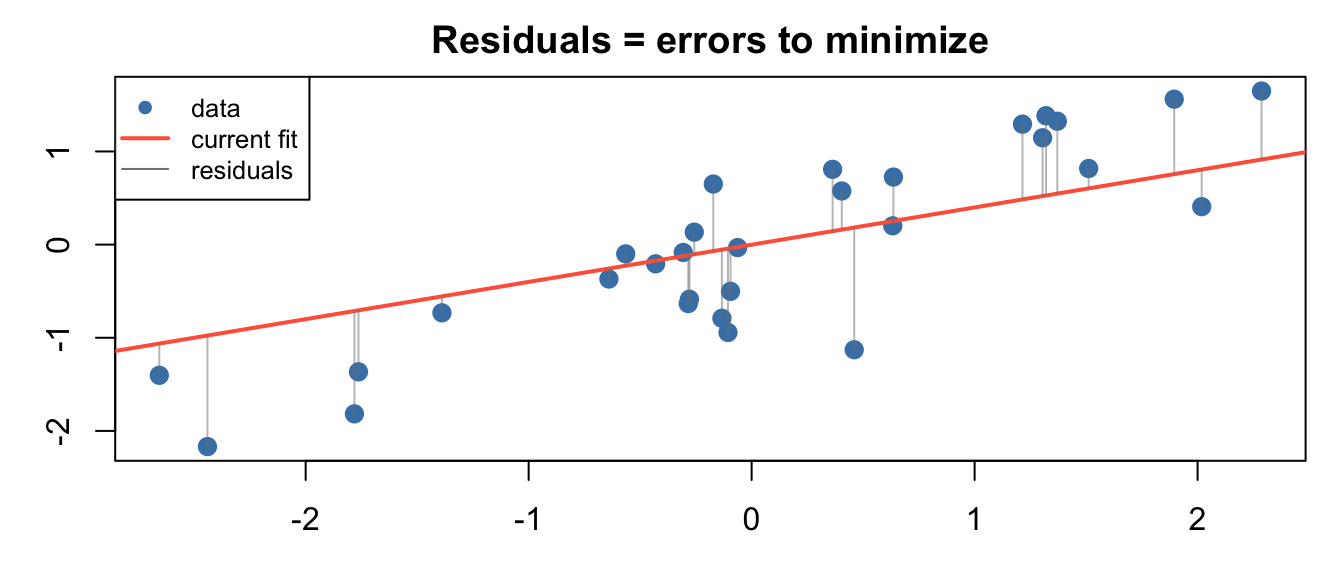
Mean Squared Error — the most common loss for regression:
L(\beta) = \frac{1}{m}\sum_{i=1}^{m} (\hat{y}^{(i)} - y^{(i)})^2
. . .
Its gradient (for linear model):
\frac{\partial L}{\partial \beta_j} = \frac{1}{m}\sum_{i} (\hat{y}^{(i)} - y^{(i)}) \cdot x_j^{(i)}
. . .
This is the “error × input” rule — the gradient is large when the error is large and the input contributed to it.
set.seed(42)
x_sim <- rnorm(30)
y_sim <- 0.8 * x_sim + rnorm(30, sd = 0.5)
y_hat <- 0.4 * x_sim # wrong beta
plot(x_sim, y_sim, pch = 19, col = "steelblue", cex = 1.2,
xlab = "x", ylab = "y", main = "Residuals = errors to minimize")
abline(0, 0.4, col = "tomato", lwd = 2)
segments(x_sim, y_sim, x_sim, y_hat, col = adjustcolor("gray50", 0.5), lwd = 1)
legend("topleft", c("data", "current fit", "residuals"),
col = c("steelblue", "tomato", "gray50"),
pch = c(19, NA, NA), lty = c(NA, 1, 1), lwd = c(NA, 2, 1), cex = 0.8)
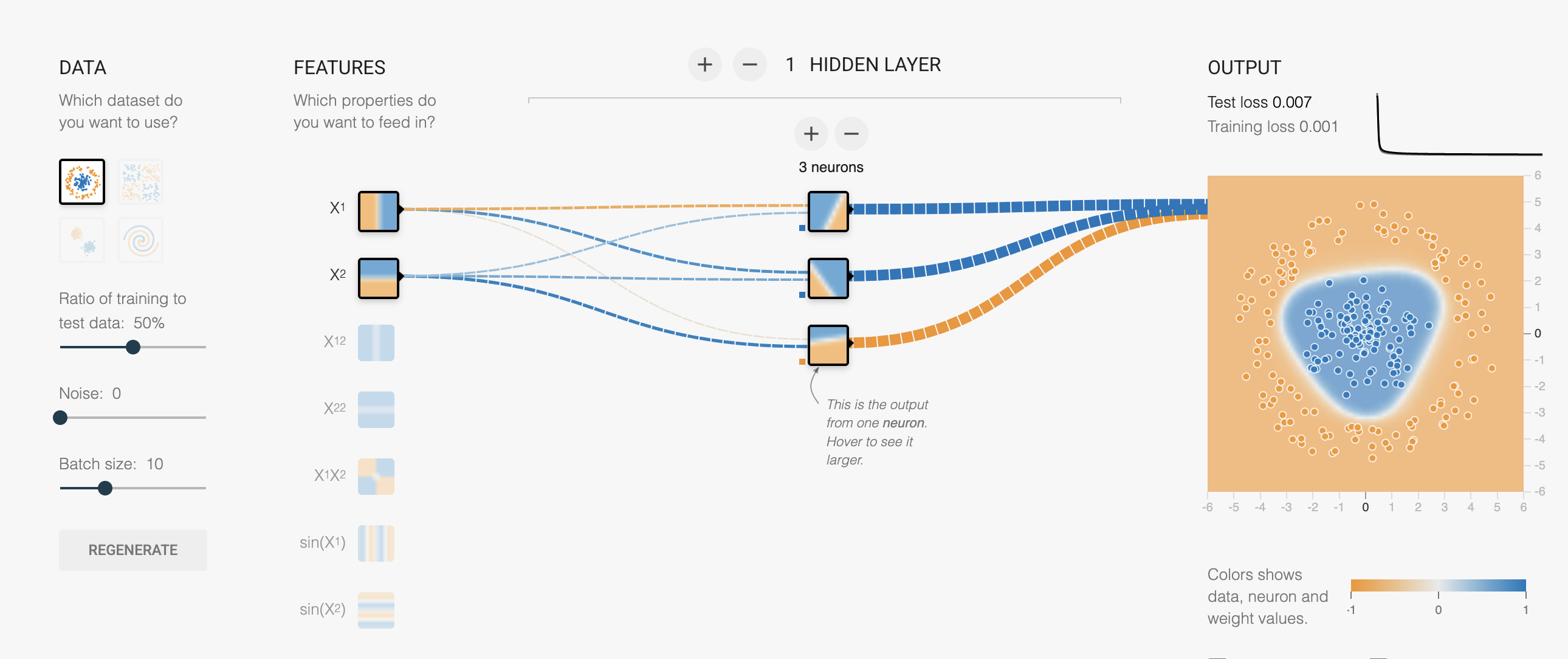
Settings:

. . .
Watch the loss curve drop — gradient descent is finding w and b right now.
Try changing the learning rate — see it converge faster or explode.
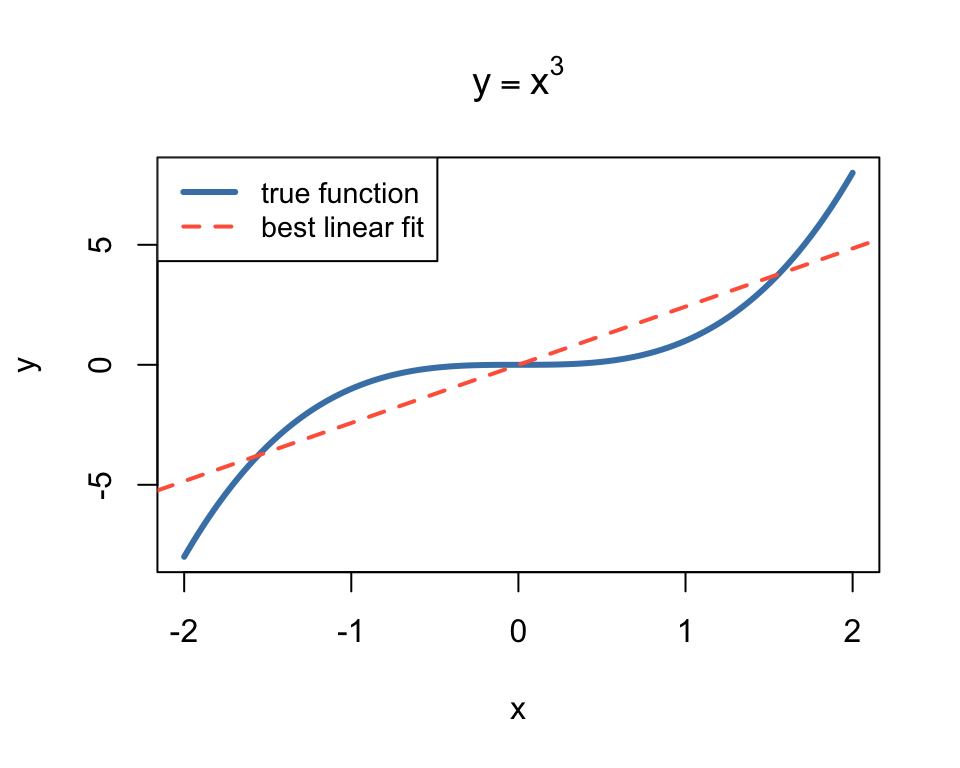
The playground fits y = wx + b perfectly on the linear dataset.
. . .
But what if the data isn’t linear?
. . .
set.seed(42)
x_nl <- seq(-2, 2, length.out = 200)
y_nl <- x_nl^3
plot(x_nl, y_nl, type = "l", lwd = 3, col = "steelblue",
xlab = "x", ylab = "y", main = expression(y == x^3))
# best linear fit
b_fit <- coef(lm(y_nl ~ x_nl))
abline(b_fit, col = "tomato", lwd = 2, lty = 2)
legend("topleft", c("true function", "best linear fit"),
col = c("steelblue", "tomato"), lwd = c(3, 2), lty = c(1, 2), cex = 0.9)
The best possible linear fit to y = x^3 is still terrible.
No amount of training will fix this — the model is wrong, not the optimizer.
Switch to dataset → Cubic (y \approx x^3)
Keep: 1 neuron, Linear activation
Hit ▶ Play and wait…

. . .
Loss stays high. The best linear fit is a flat plane through a curve.
No matter how long you train — a linear model can’t bend.
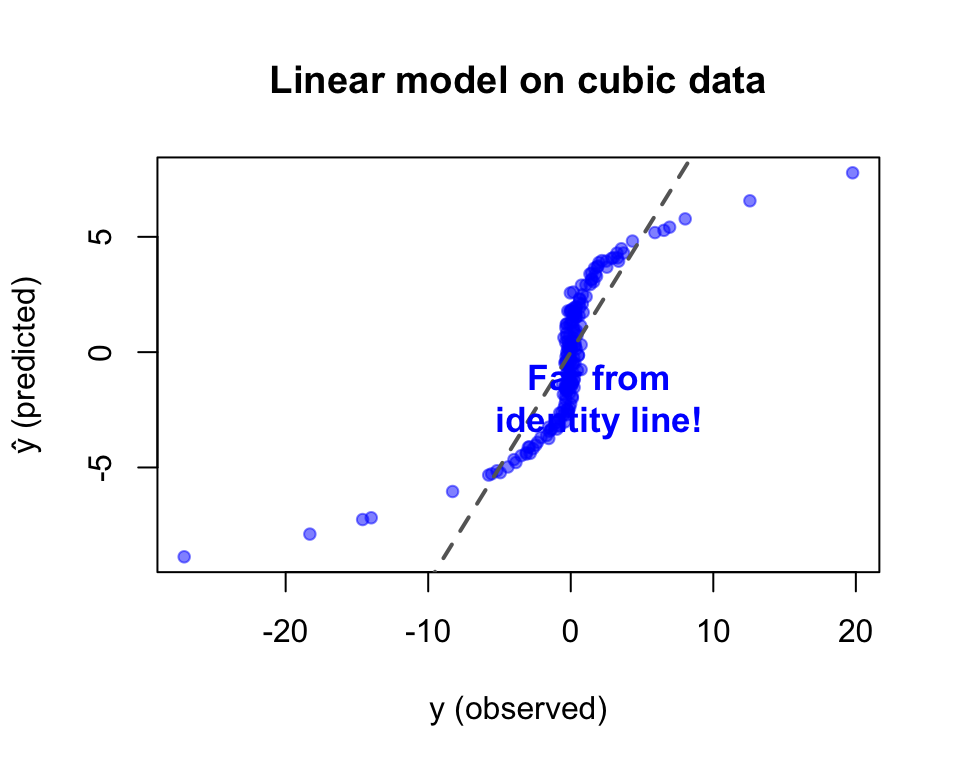
The linear model can only learn:
y = w_1 x_1 + w_2 x_2 + b
This is a plane. It cannot curve, twist, or bend.
. . .
What we need:
set.seed(42)
x_nl <- rnorm(200)
y_nl <- x_nl^3 + rnorm(200, sd = 0.3)
y_hat_lin <- coef(lm(y_nl ~ x_nl))[1] + coef(lm(y_nl ~ x_nl))[2] * x_nl
plot(y_nl, y_hat_lin, pch = 19, col = adjustcolor("tomato", 0.5), cex = 0.8,
xlab = "y (observed)", ylab = "ŷ (predicted)",
main = "Linear model on cubic data")
abline(0, 1, col = "gray40", lwd = 2, lty = 2)
text(2, -2, "Far from\nidentity line!", col = "tomato", cex = 1.1, font = 2)
. . .
Solution: add nonlinearity → build a neural network.

A neural network with:
y = W_2 \cdot \sigma(W_1 x + b_1) + b_2
. . .
Key insight: \sigma (activation function) introduces the bends that let the model fit curves.
activation
x₁ ──w₁──┐ function
├──▶ Σ ──▶ σ(·) ──▶ output
x₂ ──w₂──┘ +b
. . .
Without activation (linear):
\text{output} = w_1 x_1 + w_2 x_2 + b
Just a weighted sum — still a line!
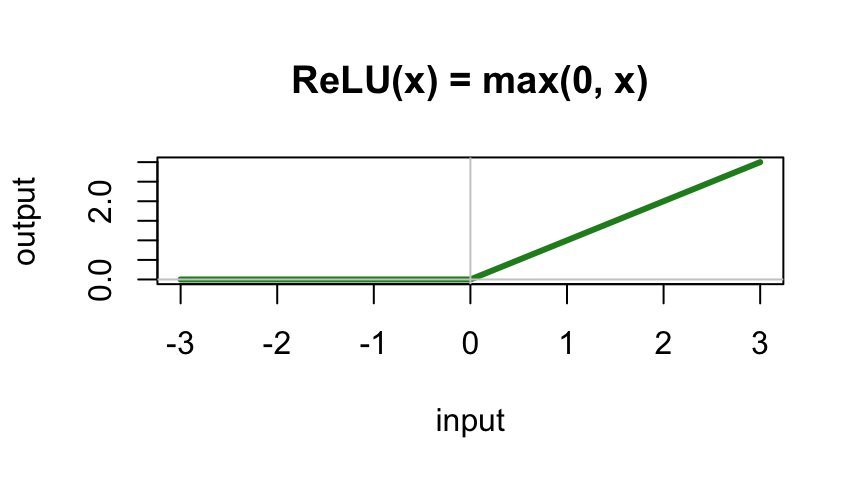
With ReLU activation:
\text{output} = \max(0, w_1 x_1 + w_2 x_2 + b)
Now it can produce a kink — a bent line!
Change activation → ReLU
Set hidden layer → 2 neurons
Hit ▶ Play

. . .
Each neuron contributes one ReLU “kink.” Combined, they approximate a curve — but it’s rough.
Loss is lower, but the fit isn’t great yet.
Increase to 4 neurons
Hit ▶ Play

. . .
More neurons = more “kinks” = smoother approximation of x^3.
Add a second layer: 4 neurons → 2 neurons
Hit ▶ Play

. . .
Layer 1 learns basic bends → Layer 2 combines them into a smooth curve.
Stacking layers = composing simple features into complex functions.
LINEAR (1 neuron, no activation) 2 NEURONS + ReLU
┌────────────────────────┐ ┌────────────────────────┐
│ ────────────── │ │ ─────╱ │
│ flat line │ │ ╱────── │
│ can't bend! │ │ two bends │
└────────────────────────┘ └────────────────────────┘
4 NEURONS + ReLU 2 LAYERS (4→2) + ReLU
┌────────────────────────┐ ┌────────────────────────┐
│ ╱‾‾‾╲ │ │ ╱‾‾‾╲ │
│ ─────╱ ╲───── │ │ ─────╱ ╲───── │
│ four bends │ │ smooth curve │
└────────────────────────┘ └────────────────────────┘
. . .
A neural network approximates any function by combining simple bent lines.
Exercise: count parameters for this network:
x₁ ──┬──▶ h₁ ──┐
├──▶ h₂ ──┼──▶ ŷ
x₂ ──┴──▶ h₃ ──┘
. . .
Layer 1: 2×3 weights + 3 biases = 9
Layer 2: 3×1 weights + 1 bias = 4
Total: 13 parameters
. . .
Manually computing gradients for 13 parameters is tedious. For millions? Impossible.
This is why we need PyTorch.
Without activation, stacking layers is pointless:
W_2(W_1 x) = (W_2 W_1) x = W'x
. . .
Any number of linear layers = one linear layer!
. . .
Try it yourself: set activation to “Linear” in the playground. Add as many layers as you want — the output is always a flat gradient.
The activation function breaks linearity, allowing each layer to add new “bends.”
Common activations:
An MLP with a single hidden layer can approximate any continuous function to arbitrary accuracy, given enough hidden neurons.
. . .
In playground terms: with enough neurons, you have enough bends to trace any curve.
. . .
What this doesn’t tell you:
. . .
More: neuralnetworksanddeeplearning.com/chap4.html
The playground does everything behind the scenes. In PyTorch, you write it:
. . .
1. Define the model:
| PyTorch code | Playground equivalent |
|---|---|
MLP(input_dim, hid_dim, output_dim) |
Network architecture (boxes) |
F.relu(...) |
Activation dropdown |
model(x) |
Data flows through network |
loss_fn(y_hat, y) |
Loss number updates |
loss.backward() |
Gradients computed (invisible in playground) |
optimizer.step() |
Weights change, output updates |
lr=0.001 |
Learning rate slider |
. . .
PyTorch gives you full control over what the playground hides.
┌─────────────┐
│ Input Data │
└──────┬──────┘
▼
┌─────────────┐
┌────▶│ Forward Pass│ ← model(x)
│ └──────┬──────┘
│ ▼
│ ┌─────────────┐
│ │ Compute Loss│ ← loss_fn(ŷ, y)
│ └──────┬──────┘
│ ▼
│ ┌─────────────┐
│ │ Backward │ ← loss.backward()
│ │ (Gradients)│ PyTorch autograd!
│ └──────┬──────┘
│ ▼
│ ┌─────────────┐
└─────│Update Params│ ← optimizer.step()
└─────────────┘
Each iteration of this loop = one “tick” of the playground.
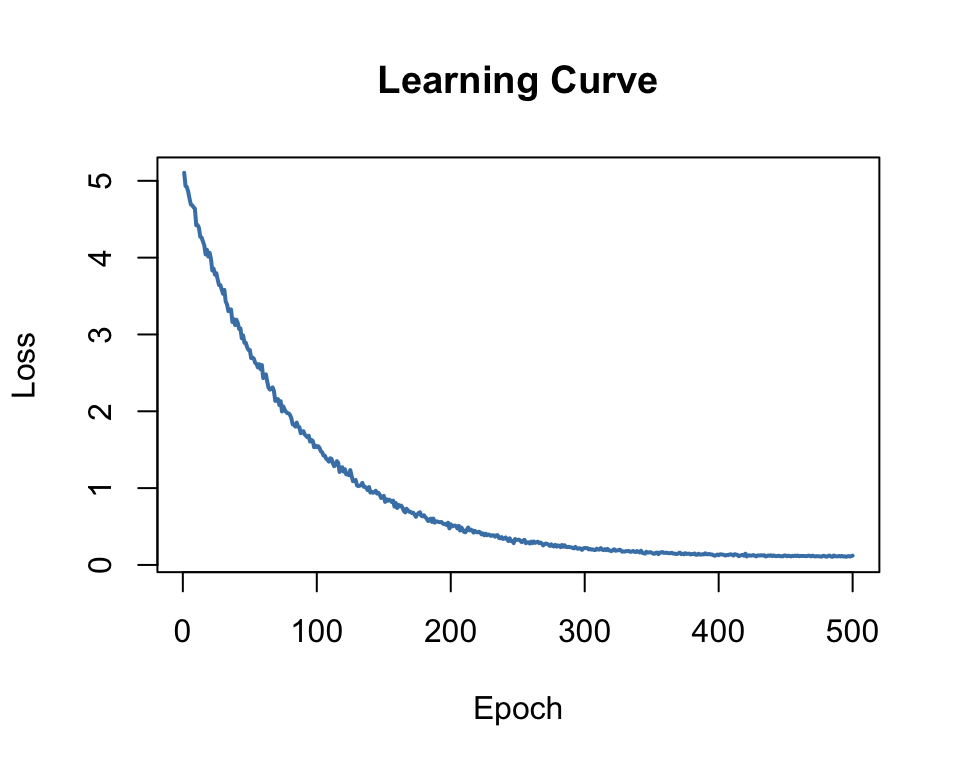
Plot loss vs epoch to monitor training:
. . .
After training an MLP with 1024 hidden neurons on y = x^3:
. . .
Predicted vs observed now hugs the identity line!
Compared to the linear model’s failure — the MLP learned the cubic relationship from data alone.
set.seed(42)
x_nl <- rnorm(300)
y_nl <- x_nl^3
# Simulate a good MLP fit (add small noise)
y_hat_good <- y_nl + rnorm(300, sd = 0.3)
plot(y_nl, y_hat_good, pch = 19, col = adjustcolor("forestgreen", 0.4), cex = 0.8,
xlab = "y (observed)", ylab = "ŷ (predicted)",
main = "MLP: predicted vs observed")
abline(0, 1, col = "gray40", lwd = 2, lty = 2)
text(-4, 4, "On the\nidentity line!", col = "forestgreen", cex = 1.1, font = 2)
Open playground.hakyimlab.org and try:
How do we feed DNA to a neural network?
Sequence: A T G C G T A
A T G C
1: [ 1 0 0 0 ] ← A
2: [ 0 1 0 0 ] ← T
3: [ 0 0 1 0 ] ← G
4: [ 0 0 0 1 ] ← C
5: [ 0 0 1 0 ] ← G
6: [ 0 1 0 0 ] ← T
7: [ 1 0 0 0 ] ← A
Shape: (sequence_length, 4)
Each base → a 4-dimensional unit vector. No ordinal relationship imposed.
DNA sequence One-hot matrix Neural network Prediction
ATGCGTAACG... → ┌─────────────┐ → ┌──────────┐ → binding score
│ 1 0 0 0 │ │ MLP or │ expression level
│ 0 1 0 0 │ │ CNN │ variant effect
│ 0 0 1 0 │ │ │ ...
│ 0 0 0 1 │ └──────────┘
│ ... │
└─────────────┘
. . .
This is the core pattern of the entire course.
Every model we study takes DNA sequence as input and predicts a biological output.
MLP (this unit)
CNN (next)
. . .
A CNN filter sliding over one-hot DNA is mathematically equivalent to scoring with a Position Weight Matrix (PWM) — but learned from data!
| Session | Topic | Notebook |
|---|---|---|
| Week 1a | Setup, intro | (this lecture) |
| Week 1b | Linear → MLP in PyTorch | hands-on-introduction_to_deep_learning.ipynb |
| Week 2 | CNN for DNA scoring | updated-basic_DNA_tutorial.ipynb |
| Week 3a | TF binding project | tf-binding-prediction-starter.ipynb |
| Week 3b | Hyperparameter tuning | tf-binding-wandb.ipynb |
Unit 1: Transformers & GPT
Unit 2: Enformer & Borzoi
. . .
The arc: MLP → CNN → Transformer → Genomic foundation models
Videos:
Interactive:
Papers (optional):
Environment: Google Colab (GPU provided, no local setup needed)
First notebook: hands-on-introduction_to_deep_learning.ipynb
---
title: "Quick Introduction to Deep Learning"
subtitle: "GENE 46100 — Unit 0"
author: "Haky Im"
date: 2025-03-25
draft: false
engine: knitr
jupyter:
kernelspec:
name: "conda-env-gene46100-py"
language: "python"
display_name: "gene46100"
format:
revealjs:
theme: default
slide-number: true
transition: fade
width: 1280
height: 720
chalkboard: true
footer: "GENE 46100 · Deep Learning in Genomics"
eval: false
---
## Course Roadmap
::: {.columns}
:::: {.column width="50%"}
| Unit | Topic |
|------|-------|
| **0** |Can we detect regulatory motifs in DNA? | **MLP, CNN, DNA scoring** | (Weeks
1–3)|
| 1 | Can we learn the "language" of DNA?|Transformers & Genomic GPT |(Weeks 4–5)|
| 2 | Can we predict gene regulation from sequence?| Enformer & Borzoi |(Weeks 6–7)|
| 3 |Can we model microbial communities?| |(Weeks 8–9)|
::::
:::: {.column width="50%"}
**Tools we'll use:**
- Python + PyTorch
- Google Colab (GPU)
- Weights & Biases
**By the end:** You'll understand how state-of-the-art models predict gene expression from DNA sequence
::::
:::
---
## What Can Deep Learning Do in Genomics?
::: {.incremental}
- **Predict TF binding** from DNA sequence alone
- **Score regulatory variants** without experiments
- **Predict gene expression** from 200kb of sequence (Enformer)
- **Generate protein structures** (AlphaFold)
- **Build DNA language models** that learn grammar of the genome
:::
. . .
> These models learn patterns we didn't know to look for.
---
## Today's Learning Objectives
::: {.incremental}
1. Understand and implement **gradient descent** to fit a linear model
2. See why linear models **fail** on nonlinear data
3. Build a **multi-layer perceptron (MLP)** that succeeds
4. Learn the basics of **PyTorch**: model, loss, optimizer
:::
---
## The Starting Point: Linear Models
::: {.columns}
:::: {.column width="50%"}
You already know this:
$$y = X\beta + \epsilon$$
where $\epsilon \sim N(0, \sigma)$
. . .
Let's simulate some data and fit it **from scratch**.
- $X$: 1000 samples × 2 features
- $y$: response variable
- $\beta$: true coefficients
::::
:::: {.column width="50%"}
```{r}
#| eval: true
#| fig-width: 5
#| fig-height: 4
set.seed(42)
x <- runif(50, -3, 3)
y <- 0.8 * x + rnorm(50, sd = 0.5)
plot(x, y, pch = 19, col = "steelblue", cex = 1.2,
xlab = "X", ylab = "Y", main = "Linear: Y = 0.8X + noise")
abline(lm(y ~ x), col = "tomato", lwd = 2)
```
::::
:::
---
## Predict with Ground Truth Parameters
::: {.columns}
:::: {.column width="50%"}
Since we simulated the data, we **know** the true $\beta$.
We can compute $\hat{y} = X\beta$ and compare to $y$:
```python
y_hat = x.dot(coef) + bias
```
. . .
**If the model is correct**, points fall on the identity line.
The scatter off the line = noise $\epsilon$.
::::
:::: {.column width="50%"}
```{r}
#| eval: true
#| fig-width: 5
#| fig-height: 4.5
set.seed(42)
n <- 200
x1 <- rnorm(n); x2 <- rnorm(n)
coef <- c(0.8, 0.5)
y <- x1 * coef[1] + x2 * coef[2] + rnorm(n, sd = 0.3)
y_hat <- x1 * coef[1] + x2 * coef[2]
plot(y, y_hat, pch = 19, col = adjustcolor("steelblue", 0.5), cex = 1,
xlab = "y (observed)", ylab = "ŷ (predicted)",
main = "Predicted vs Observed (true β)")
abline(0, 1, col = "gray40", lwd = 2, lty = 2)
```
::::
:::
---
## The Analytical Solution: Normal Equation
For linear regression, there's a **closed-form** solution:
$$\hat{\beta} = (X^TX)^{-1}X^Ty$$
. . .
```python
b_hat = inv(x.T @ x) @ (x.T @ y)
```
. . .
::: {.columns}
:::: {.column width="50%"}
**Estimated:** $\hat{\beta} \approx$ true $\beta$
This works because linear regression has a **convex** loss surface — one global minimum.
::::
:::: {.column width="50%"}
```{r}
#| eval: true
#| fig-width: 5
#| fig-height: 3.5
# Loss surface for 1D regression
beta_seq <- seq(-1, 2, length.out = 100)
set.seed(42)
x_sim <- rnorm(100)
y_sim <- 0.8 * x_sim + rnorm(100, sd = 0.5)
loss <- sapply(beta_seq, function(b) mean((y_sim - b * x_sim)^2))
plot(beta_seq, loss, type = "l", lwd = 3, col = "tomato",
xlab = expression(beta), ylab = "MSE Loss",
main = "Loss Surface (convex)")
abline(v = 0.8, col = "steelblue", lwd = 2, lty = 2)
text(0.8, max(loss)*0.9, expression(beta["true"]), col = "steelblue", pos = 4, cex = 1.2)
```
::::
:::
---
## But What if We Can't Solve It Analytically?
The normal equation works for linear models...
. . .
**But most interesting models don't have closed-form solutions.**
::: {.incremental}
- Neural networks with millions of parameters?
- Nonlinear activation functions?
- Complex architectures?
:::
. . .
**We need a general-purpose optimization method.**
---
## What is a Gradient?
A gradient is the **derivative** of a function — it tells us the slope.
$$f'(\beta) = \lim_{\Delta\beta \to 0} \frac{f(\beta + \Delta\beta) - f(\beta)}{\Delta\beta}$$
. . .
::: {.columns}
:::: {.column width="50%"}
- **Positive gradient** → function is increasing → move left
- **Negative gradient** → function is decreasing → move right
- **Zero gradient** → you're at a minimum (or maximum)
::::
:::: {.column width="50%"}
```{r}
#| eval: true
#| fig-width: 5
#| fig-height: 3.5
x_vals <- seq(-2, 3, length.out = 200)
y_vals <- (x_vals - 0.8)^2 + 0.5
plot(x_vals, y_vals, type = "l", lwd = 3, col = "gray30",
xlab = expression(beta), ylab = expression(L(beta)),
main = "Gradient = Slope of Loss")
# Show gradient at a point
pt <- 2.2
slope <- 2 * (pt - 0.8)
y_pt <- (pt - 0.8)^2 + 0.5
arrows(pt, y_pt, pt - 0.5, y_pt - 0.5 * slope, col = "tomato", lwd = 3, length = 0.15)
points(pt, y_pt, pch = 19, col = "tomato", cex = 2)
text(pt + 0.15, y_pt + 0.3, "gradient\npoints uphill", col = "tomato", cex = 0.9)
points(0.8, 0.5, pch = 4, col = "steelblue", cex = 2, lwd = 3)
text(0.8, 0.8, "minimum", col = "steelblue", cex = 0.9)
```
::::
:::
---
## Gradient Descent: Follow the Slope Downhill
::: {.columns}
:::: {.column width="50%"}
{fig-align="center" width="100%"}
::::
:::: {.column width="50%"}
**Algorithm:**
1. Start at a **random** $\beta$ (high loss)
2. Compute the **gradient** (slope)
3. Take a step **opposite** to the gradient
4. Repeat until convergence
. . .
$$\beta_{t+1} = \beta_t - \alpha \cdot \nabla L(\beta_t)$$
$\alpha$ = **learning rate** (step size)
::::
:::
---
## The Learning Rate $\alpha$
::: {.columns}
:::: {.column width="33%"}
**Too small** ($\alpha = 0.0001$)
```{r}
#| eval: true
#| fig-width: 3.5
#| fig-height: 3
x_vals <- seq(-1, 3, length.out = 200)
loss_fn <- function(b) (b - 0.8)^2 + 0.5
plot(x_vals, loss_fn(x_vals), type = "l", lwd = 2, col = "gray30",
xlab = expression(beta), ylab = "Loss", main = "Too small")
b <- 2.5; lr <- 0.05
for(i in 1:8) {
b_new <- b - lr * 2 * (b - 0.8)
points(b, loss_fn(b), pch = 19, col = "tomato", cex = 1.2)
b <- b_new
}
```
Tiny steps → very slow
::::
:::: {.column width="33%"}
**Just right** ($\alpha = 0.003$)
```{r}
#| eval: true
#| fig-width: 3.5
#| fig-height: 3
plot(x_vals, loss_fn(x_vals), type = "l", lwd = 2, col = "gray30",
xlab = expression(beta), ylab = "Loss", main = "Just right")
b <- 2.5; lr <- 0.3
for(i in 1:8) {
b_new <- b - lr * 2 * (b - 0.8)
segments(b, loss_fn(b), b_new, loss_fn(b_new), col = "forestgreen", lwd = 2)
points(b, loss_fn(b), pch = 19, col = "forestgreen", cex = 1.2)
b <- b_new
}
points(b, loss_fn(b), pch = 19, col = "forestgreen", cex = 1.2)
```
Smooth convergence
::::
:::: {.column width="34%"}
**Too large** ($\alpha = 0.1$)
```{r}
#| eval: true
#| fig-width: 3.5
#| fig-height: 3
plot(x_vals, loss_fn(x_vals), type = "l", lwd = 2, col = "gray30",
xlab = expression(beta), ylab = "Loss", main = "Too large")
b <- 2.5; lr <- 0.95
for(i in 1:5) {
b_new <- b - lr * 2 * (b - 0.8)
segments(b, loss_fn(b), b_new, loss_fn(b_new), col = "red3", lwd = 2)
points(b, loss_fn(b), pch = 19, col = "red3", cex = 1.2)
b <- b_new
}
```
Overshoots → diverges!
::::
:::
---
## GD Trajectory: Watching $\beta$ Converge
::: {.columns}
:::: {.column width="50%"}
With 2 parameters ($\beta_1$, $\beta_2$), gradient descent traces a path through parameter space:
```python
for _ in range(50):
diff = x.dot(b) - y
grad = diff.dot(x) / n
b -= lr * grad
```
The trajectory spirals toward the true $\beta$.
::::
:::: {.column width="50%"}
```{r}
#| eval: true
#| fig-width: 5
#| fig-height: 4.5
set.seed(42)
n <- 200
x_mat <- matrix(rnorm(n * 2), n, 2)
true_coef <- c(0.8, 0.5)
y_sim <- x_mat %*% true_coef + rnorm(n, sd = 0.3)
b <- c(0, 0); lr <- 0.1
traj <- matrix(NA, 30, 2)
for(i in 1:30) {
traj[i,] <- b
grad <- t(x_mat) %*% (x_mat %*% b - y_sim) / n
b <- b - lr * as.vector(grad)
}
plot(traj[,1], traj[,2], type = "b", pch = 19, col = "tomato", lwd = 2,
xlab = expression(beta[1]), ylab = expression(beta[2]),
main = "GD Trajectory in Parameter Space",
xlim = c(-0.1, 0.9), ylim = c(-0.1, 0.6))
points(true_coef[1], true_coef[2], pch = 4, col = "steelblue", cex = 3, lwd = 3)
text(true_coef[1]+0.05, true_coef[2]+0.03, expression(beta["true"]), col = "steelblue", cex = 1.1)
points(0, 0, pch = 1, col = "gray50", cex = 2, lwd = 2)
text(0.05, -0.04, "start", col = "gray50", cex = 0.9)
```
::::
:::
---
## Stochastic Gradient Descent (SGD)
In practice, datasets are huge — computing gradients on **all** data is expensive.
. . .
**Solution:** use a random **mini-batch** at each step.
$$\nabla L \approx \frac{1}{|B|} \sum_{i \in B} \nabla L_i$$
. . .
::: {.columns}
:::: {.column width="50%"}
**Full-batch GD:**
- Exact gradient
- Slow per step
- Smooth path
::::
:::: {.column width="50%"}
**SGD (mini-batch):**
- Approximate gradient
- Fast per step
- Noisy but effective path
::::
:::
. . .
The noise actually **helps** escape bad local minima!
---
## Three Components of Machine Learning
Every ML model needs these three ingredients:
. . .
```
┌─────────────────────────────────────────────────────────┐
│ │
│ ┌───────────┐ ┌───────────────┐ ┌───────────┐ │
│ │ MODEL │ │ LOSS │ │ OPTIMIZER │ │
│ │ │ │ │ │ │ │
│ │ ŷ = f(x) │───▶│ L(ŷ, y) │───▶│ β ← β-α∇L│ │
│ │ │ │ │ │ │ │
│ │ (defines │ │ (measures how │ │ (updates │ │
│ │ the │ │ wrong we │ │ params │ │
│ │ hypothesis) │ are) │ │ to │ │
│ │ │ │ │ │ reduce │ │
│ └───────────┘ └───────────────┘ │ loss) │ │
│ └───────────┘ │
│ │
└─────────────────────────────────────────────────────────┘
```
. . .
| Component | Linear regression | Neural network |
|-----------|------------------|---------------|
| **Model** | $y = X\beta$ | $y = W_2 \sigma(W_1 x + b_1) + b_2$ |
| **Loss** | MSE | MSE, cross-entropy, ... |
| **Optimizer** | Normal equation | SGD, Adam, ... |
---
## The Loss Function: MSE
**Mean Squared Error** — the most common loss for regression:
$$L(\beta) = \frac{1}{m}\sum_{i=1}^{m} (\hat{y}^{(i)} - y^{(i)})^2$$
. . .
::: {.columns}
:::: {.column width="50%"}
**Its gradient** (for linear model):
$$\frac{\partial L}{\partial \beta_j} = \frac{1}{m}\sum_{i} (\hat{y}^{(i)} - y^{(i)}) \cdot x_j^{(i)}$$
. . .
This is the "error × input" rule — the gradient is large when the error is large **and** the input contributed to it.
::::
:::: {.column width="50%"}
```{r}
#| eval: true
#| fig-width: 5
#| fig-height: 3.5
set.seed(42)
x_sim <- rnorm(30)
y_sim <- 0.8 * x_sim + rnorm(30, sd = 0.5)
y_hat <- 0.4 * x_sim # wrong beta
plot(x_sim, y_sim, pch = 19, col = "steelblue", cex = 1.2,
xlab = "x", ylab = "y", main = "Residuals = errors to minimize")
abline(0, 0.4, col = "tomato", lwd = 2)
segments(x_sim, y_sim, x_sim, y_hat, col = adjustcolor("gray50", 0.5), lwd = 1)
legend("topleft", c("data", "current fit", "residuals"),
col = c("steelblue", "tomato", "gray50"),
pch = c(19, NA, NA), lty = c(NA, 1, 1), lwd = c(NA, 2, 1), cex = 0.8)
```
::::
:::
---
## See It Live: Fit a Line in the Playground
::: {.columns}
:::: {.column width="55%"}
Open **[playground.hakyimlab.org](https://playground.hakyimlab.org/#activation=linear&batchSize=10&dataset=circle®Dataset=reg-plane&learningRate=0.03®ularizationRate=0&noise=0&networkShape=1&seed=0.55802&showTestData=false&discretize=false&percTrainData=50&x=true&y=true&xTimesY=false&xSquared=false&ySquared=false&cosX=false&sinX=false&cosY=false&sinY=false&collectStats=false&problem=regression&initZero=false&hideText=false)**
Settings:
- Problem type → **Regression**
- Dataset → **reg-plane** (linear data)
- 1 hidden neuron, **Linear** activation
- Hit ▶ Play
::::
:::: {.column width="45%"}
{fig-align="center" width="100%"}
::::
:::
. . .
Watch the **loss curve** drop — gradient descent is finding $w$ and $b$ right now.
**Try changing the learning rate** — see it converge faster or explode.
---
## Linear Model Succeeds — On Linear Data
The playground fits $y = wx + b$ perfectly on the linear dataset.
. . .
**But what if the data isn't linear?**
. . .
::: {.columns}
:::: {.column width="50%"}
```{r}
#| eval: true
#| fig-width: 5
#| fig-height: 4
set.seed(42)
x_nl <- seq(-2, 2, length.out = 200)
y_nl <- x_nl^3
plot(x_nl, y_nl, type = "l", lwd = 3, col = "steelblue",
xlab = "x", ylab = "y", main = expression(y == x^3))
# best linear fit
b_fit <- coef(lm(y_nl ~ x_nl))
abline(b_fit, col = "tomato", lwd = 2, lty = 2)
legend("topleft", c("true function", "best linear fit"),
col = c("steelblue", "tomato"), lwd = c(3, 2), lty = c(1, 2), cex = 0.9)
```
::::
:::: {.column width="50%"}
The **best possible** linear fit to $y = x^3$ is still terrible.
No amount of training will fix this — the **model** is wrong, not the optimizer.
::::
:::
---
## Try Cubic Data in the Playground
::: {.columns}
:::: {.column width="55%"}
Switch to dataset → **Cubic** ($y \approx x^3$)
Keep: 1 neuron, **Linear** activation
Hit ▶ Play and wait...
::::
:::: {.column width="45%"}
{fig-align="center" width="100%"}
::::
:::
. . .
**Loss stays high.** The best linear fit is a flat plane through a curve.
No matter how long you train — a linear model can't bend.
---
## Why Linear Models Fail on Nonlinear Data
::: {.columns}
:::: {.column width="50%"}
The linear model can only learn:
$$y = w_1 x_1 + w_2 x_2 + b$$
This is a **plane**. It cannot curve, twist, or bend.
. . .
**What we need:**
- A model that can learn *any* shape
- Without us specifying the functional form
- From data alone
::::
:::: {.column width="50%"}
```{r}
#| eval: true
#| fig-width: 5
#| fig-height: 4
set.seed(42)
x_nl <- rnorm(200)
y_nl <- x_nl^3 + rnorm(200, sd = 0.3)
y_hat_lin <- coef(lm(y_nl ~ x_nl))[1] + coef(lm(y_nl ~ x_nl))[2] * x_nl
plot(y_nl, y_hat_lin, pch = 19, col = adjustcolor("tomato", 0.5), cex = 0.8,
xlab = "y (observed)", ylab = "ŷ (predicted)",
main = "Linear model on cubic data")
abline(0, 1, col = "gray40", lwd = 2, lty = 2)
text(2, -2, "Far from\nidentity line!", col = "tomato", cex = 1.1, font = 2)
```
::::
:::
. . .
**Solution:** add nonlinearity → build a neural network.
---
## Multi-Layer Perceptron (MLP)
::: {.columns}
:::: {.column width="50%"}
{fig-align="center" width="100%"}
::::
:::: {.column width="50%"}
A neural network with:
- **Input layer**: your features
- **Hidden layer(s)**: with nonlinear activation
- **Output layer**: prediction
$$y = W_2 \cdot \sigma(W_1 x + b_1) + b_2$$
. . .
**Key insight:** $\sigma$ (activation function) introduces the **bends** that let the model fit curves.
::::
:::
---
## What Does a Neuron Do?
```
activation
x₁ ──w₁──┐ function
├──▶ Σ ──▶ σ(·) ──▶ output
x₂ ──w₂──┘ +b
```
. . .
::: {.columns}
:::: {.column width="50%"}
**Without activation (linear):**
$\text{output} = w_1 x_1 + w_2 x_2 + b$
Just a weighted sum — still a line!
::::
:::: {.column width="50%"}
**With ReLU activation:**
$\text{output} = \max(0, w_1 x_1 + w_2 x_2 + b)$
Now it can produce a **kink** — a bent line!
```{r}
#| eval: true
#| fig-width: 4.5
#| fig-height: 2.5
x_vals <- seq(-3, 3, length.out = 200)
relu <- pmax(0, x_vals)
plot(x_vals, relu, type = "l", lwd = 3, col = "forestgreen",
xlab = "input", ylab = "output", main = "ReLU(x) = max(0, x)")
abline(h = 0, col = "gray80"); abline(v = 0, col = "gray80")
```
::::
:::
---
## Building Up: 2 Neurons = 2 Bends
::: {.columns}
:::: {.column width="55%"}
Change activation → **ReLU**
Set hidden layer → **2 neurons**
Hit ▶ Play
::::
:::: {.column width="45%"}
{fig-align="center" width="100%"}
::::
:::
. . .
Each neuron contributes one ReLU "kink." Combined, they approximate a curve — but it's rough.
**Loss is lower, but the fit isn't great yet.**
---
## 4 Neurons = 4 Bends = Smoother
::: {.columns}
:::: {.column width="55%"}
Increase to **4 neurons**
Hit ▶ Play
::::
:::: {.column width="45%"}
{fig-align="center" width="100%"}
::::
:::
. . .
More neurons = more "kinks" = smoother approximation of $x^3$.
---
## Adding Depth: 2 Layers (4 → 2)
::: {.columns}
:::: {.column width="55%"}
Add a second layer: **4 neurons → 2 neurons**
Hit ▶ Play
::::
:::: {.column width="45%"}
{fig-align="center" width="100%"}
::::
:::
. . .
Layer 1 learns basic bends → Layer 2 **combines** them into a smooth curve.
**Stacking layers = composing simple features into complex functions.**
---
## The MLP Progression — Summary
```
LINEAR (1 neuron, no activation) 2 NEURONS + ReLU
┌────────────────────────┐ ┌────────────────────────┐
│ ────────────── │ │ ─────╱ │
│ flat line │ │ ╱────── │
│ can't bend! │ │ two bends │
└────────────────────────┘ └────────────────────────┘
4 NEURONS + ReLU 2 LAYERS (4→2) + ReLU
┌────────────────────────┐ ┌────────────────────────┐
│ ╱‾‾‾╲ │ │ ╱‾‾‾╲ │
│ ─────╱ ╲───── │ │ ─────╱ ╲───── │
│ four bends │ │ smooth curve │
└────────────────────────┘ └────────────────────────┘
```
. . .
**A neural network approximates any function by combining simple bent lines.**
---
## Counting Parameters
::: {.columns}
:::: {.column width="50%"}
**Exercise:** count parameters for this network:
- Input: 2 features
- Hidden: 3 neurons
- Output: 1
::::
:::: {.column width="50%"}
```
x₁ ──┬──▶ h₁ ──┐
├──▶ h₂ ──┼──▶ ŷ
x₂ ──┴──▶ h₃ ──┘
```
. . .
**Layer 1:** 2×3 weights + 3 biases = **9**
**Layer 2:** 3×1 weights + 1 bias = **4**
**Total: 13 parameters**
::::
:::
. . .
Manually computing gradients for 13 parameters is tedious. For millions? Impossible.
**This is why we need PyTorch.**
---
## Why the Activation Function Matters
Without activation, stacking layers is pointless:
$$W_2(W_1 x) = (W_2 W_1) x = W'x$$
. . .
**Any number of linear layers = one linear layer!**
. . .
::: {.columns}
:::: {.column width="50%"}
**Try it yourself:** set activation to "Linear" in the playground. Add as many layers as you want — the output is always a flat gradient.
::::
:::: {.column width="50%"}
The activation function **breaks** linearity, allowing each layer to add new "bends."
Common activations:
- **ReLU**: $\max(0, x)$ — fast, simple
- **Tanh**: $\frac{e^x - e^{-x}}{e^x + e^{-x}}$ — S-curve
- **Sigmoid**: $\frac{1}{1+e^{-x}}$ — for probabilities
::::
:::
---
## Universal Approximation Theorem
> An MLP with a single hidden layer can approximate any continuous function to arbitrary accuracy, given enough hidden neurons.
. . .
**In playground terms:** with enough neurons, you have enough bends to trace any curve.
. . .
**What this doesn't tell you:**
- How many neurons you need
- Whether it will learn efficiently
- Whether it will generalize to new data
. . .
*More: [neuralnetworksanddeeplearning.com/chap4.html](http://neuralnetworksanddeeplearning.com/chap4.html)*
---
## From Playground to PyTorch
The playground does everything behind the scenes. In PyTorch, **you** write it:
. . .
::: {.columns}
:::: {.column width="50%"}
**1. Define the model:**
```python
class MLP(nn.Module):
def __init__(self, input_dim, hid_dim,
output_dim):
super().__init__()
self.fc1 = nn.Linear(input_dim, hid_dim)
self.fc2 = nn.Linear(hid_dim, output_dim)
def forward(self, x):
x = F.relu(self.fc1(x))
return self.fc2(x).squeeze(1)
```
::::
:::: {.column width="50%"}
**2. Train it:**
```python
model = MLP(1, 1024, 1)
optimizer = torch.optim.SGD(
model.parameters(), lr=0.001)
loss_fn = nn.MSELoss()
for epoch in range(10000):
y_hat = model(x) # forward
loss = loss_fn(y_hat, y) # loss
loss.backward() # gradients
optimizer.step() # update
optimizer.zero_grad() # reset
```
::::
:::
---
## PyTorch ↔ Playground
| PyTorch code | Playground equivalent |
|---------|-----------|
| `MLP(input_dim, hid_dim, output_dim)` | Network architecture (boxes) |
| `F.relu(...)` | Activation dropdown |
| `model(x)` | Data flows through network |
| `loss_fn(y_hat, y)` | Loss number updates |
| `loss.backward()` | Gradients computed (invisible in playground) |
| `optimizer.step()` | Weights change, output updates |
| `lr=0.001` | Learning rate slider |
. . .
**PyTorch gives you full control over what the playground hides.**
---
## The Training Loop — Visually
```
┌─────────────┐
│ Input Data │
└──────┬──────┘
▼
┌─────────────┐
┌────▶│ Forward Pass│ ← model(x)
│ └──────┬──────┘
│ ▼
│ ┌─────────────┐
│ │ Compute Loss│ ← loss_fn(ŷ, y)
│ └──────┬──────┘
│ ▼
│ ┌─────────────┐
│ │ Backward │ ← loss.backward()
│ │ (Gradients)│ PyTorch autograd!
│ └──────┬──────┘
│ ▼
│ ┌─────────────┐
└─────│Update Params│ ← optimizer.step()
└─────────────┘
```
Each iteration of this loop = one "tick" of the playground.
---
## The Learning Curve
::: {.columns}
:::: {.column width="50%"}
Plot **loss vs epoch** to monitor training:
```python
learning_curve = []
for epoch in range(10000):
...
learning_curve.append(loss.item())
qplot(range(10000), learning_curve,
xlab="epoch", ylab="loss")
```
::::
:::: {.column width="50%"}
```{r}
#| eval: true
#| fig-width: 5
#| fig-height: 4
epochs <- 1:500
loss <- 5 * exp(-epochs / 80) + 0.1 + rnorm(500, sd = 0.05) * exp(-epochs/200)
loss <- pmax(loss, 0.08)
plot(epochs, loss, type = "l", col = "steelblue", lwd = 2,
xlab = "Epoch", ylab = "Loss", main = "Learning Curve")
```
::::
:::
. . .
- **Dropping** = model is learning
- **Flat** = converged (or stuck)
- **Increasing** = learning rate too high!
---
## MLP Succeeds on Cubic Data!
::: {.columns}
:::: {.column width="50%"}
After training an MLP with 1024 hidden neurons on $y = x^3$:
```python
mlp = MLP(input_dim=1,
hid_dim=1024,
output_dim=1)
```
. . .
**Predicted vs observed now hugs the identity line!**
Compared to the linear model's failure — the MLP learned the cubic relationship from data alone.
::::
:::: {.column width="50%"}
```{r}
#| eval: true
#| fig-width: 5
#| fig-height: 4.5
set.seed(42)
x_nl <- rnorm(300)
y_nl <- x_nl^3
# Simulate a good MLP fit (add small noise)
y_hat_good <- y_nl + rnorm(300, sd = 0.3)
plot(y_nl, y_hat_good, pch = 19, col = adjustcolor("forestgreen", 0.4), cex = 0.8,
xlab = "y (observed)", ylab = "ŷ (predicted)",
main = "MLP: predicted vs observed")
abline(0, 1, col = "gray40", lwd = 2, lty = 2)
text(-4, 4, "On the\nidentity line!", col = "forestgreen", cex = 1.1, font = 2)
```
::::
:::
---
## Your Turn: Explore the Playground
Open [playground.hakyimlab.org](https://playground.hakyimlab.org/#activation=relu&batchSize=10&dataset=circle®Dataset=reg-gauss&learningRate=0.01®ularizationRate=0&noise=0&networkShape=4,2&seed=0.55802&showTestData=false&discretize=false&percTrainData=50&x=true&y=true&xTimesY=false&xSquared=false&ySquared=false&cosX=false&sinX=false&cosY=false&sinY=false&collectStats=false&problem=regression&initZero=false&hideText=false) and try:
::: {.incremental}
1. **Regression → Cubic**: increase neurons from 1 to 8 — watch the fit improve
2. **Switch to Classification → Circle**: same idea, different task
3. **Set activation to Linear** — can it ever fit a curve or separate a circle?
4. **Crank learning rate to 1.0** — what happens to the loss?
5. **Turn on "Show test data"** — is a big network overfitting?
:::
---
## DNA as Data: One-Hot Encoding
How do we feed DNA to a neural network?
```
Sequence: A T G C G T A
A T G C
1: [ 1 0 0 0 ] ← A
2: [ 0 1 0 0 ] ← T
3: [ 0 0 1 0 ] ← G
4: [ 0 0 0 1 ] ← C
5: [ 0 0 1 0 ] ← G
6: [ 0 1 0 0 ] ← T
7: [ 1 0 0 0 ] ← A
```
**Shape: (sequence_length, 4)**
Each base → a 4-dimensional unit vector. No ordinal relationship imposed.
---
## From DNA to Prediction
```
DNA sequence One-hot matrix Neural network Prediction
ATGCGTAACG... → ┌─────────────┐ → ┌──────────┐ → binding score
│ 1 0 0 0 │ │ MLP or │ expression level
│ 0 1 0 0 │ │ CNN │ variant effect
│ 0 0 1 0 │ │ │ ...
│ 0 0 0 1 │ └──────────┘
│ ... │
└─────────────┘
```
. . .
**This is the core pattern of the entire course.**
Every model we study takes DNA sequence as input and predicts a biological output.
---
## MLP vs CNN: A Preview
::: {.columns}
:::: {.column width="50%"}
**MLP** (this unit)
- Flatten DNA → single vector
- Every input connected to every neuron
- No concept of "position"
- Good for learning the basics
::::
:::: {.column width="50%"}
**CNN** (next)
- Preserve sequential structure
- Sliding window = **motif scanner**
- Learned filters ≈ PWMs
- The workhorse of genomic DL
::::
:::
. . .
A CNN filter sliding over one-hot DNA is mathematically equivalent to scoring with a **Position Weight Matrix (PWM)** — but learned from data!
---
## Unit 0 Plan: Weeks 1–3
| Session | Topic | Notebook |
|---------|-------|----------|
| Week 1a | Setup, intro | *(this lecture)* |
| Week 1b | Linear → MLP in PyTorch | `hands-on-introduction_to_deep_learning.ipynb` |
| Week 2 | CNN for DNA scoring | `updated-basic_DNA_tutorial.ipynb` |
| Week 3a | TF binding project | `tf-binding-prediction-starter.ipynb` |
| Week 3b | Hyperparameter tuning | `tf-binding-wandb.ipynb` |
---
## What's Coming Next
::: {.columns}
:::: {.column width="50%"}
**Unit 1: Transformers & GPT**
- Attention mechanism
- Karpathy's nanoGPT
- Train a DNA language model
- Fine-tune for promoter prediction
::::
:::: {.column width="50%"}
**Unit 2: Enformer & Borzoi**
- Predict epigenome from 200kb DNA
- Variant effect prediction
- Connection to GWAS/PrediXcan
::::
:::
. . .
**The arc:** MLP → CNN → Transformer → Genomic foundation models
---
## Resources
**Videos:**
- [3Blue1Brown: Neural Networks](https://www.3blue1brown.com/topics/neural-networks) — beautiful visual intuition
- [Karpathy: Building GPT from scratch](https://www.youtube.com/watch?v=kCc8FmEb1nY) — we'll use this in Unit 1
**Interactive:**
- [playground.hakyimlab.org](https://playground.hakyimlab.org/#activation=relu&batchSize=10&dataset=circle®Dataset=reg-gauss&learningRate=0.01®ularizationRate=0&noise=0&networkShape=4,2&seed=0.55802&showTestData=false&discretize=false&percTrainData=50&x=true&y=true&xTimesY=false&xSquared=false&ySquared=false&cosX=false&sinX=false&cosY=false&sinY=false&collectStats=false&problem=regression&initZero=false&hideText=false) — experiment with MLP architecture interactively
- [playground-guide.md](playground-guide.md) — reference for all playground controls
**Papers (optional):**
- Avsec et al. 2021 — Enformer
- Linder et al. 2023 — Borzoi
---
## Getting Started
**Environment:** Google Colab (GPU provided, no local setup needed)
**First notebook:** `hands-on-introduction_to_deep_learning.ipynb`
```python
device = torch.device('cuda' if torch.cuda.is_available() else 'cpu')
```
---
## Questions?